How to determine the SQL DB Version After Upgrading the SES?
After upgrading the server for example from 6.2 to 6.5, end user may encounter when launching the SES console, whereby it is prompting to upgrade DB again. There is no option to cancel, just to click OK button.
It is possible that the upgrade was not completed successfully. It is advised to check the SQL as to what version the Database is on to determine if the upgrade is required or not.
In SQL Management Studio, under Tables --> click on dbo.version --> right click --> select top 1000 rows. This should return a Label and last modified date. Label will be the DB version.
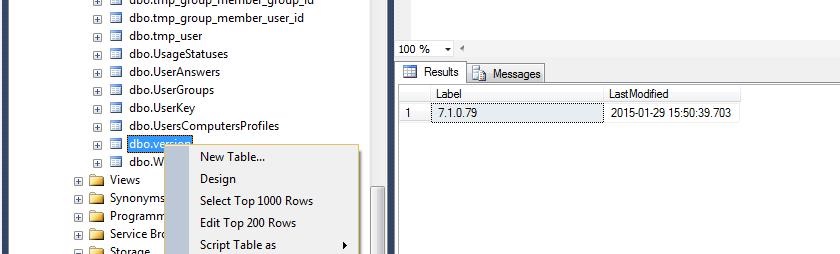
For example, if the Label field is showing blank, then the customer can proceeded with DB upgrade on SES server
Once the upgrade is completed, the correct version number should appear in SQL under dbo.version.
Please confirmed that the administrator can log in and out of SES console without any extra prompts. SDconnex should be running, and the clients should be able to communicate.
Custom Fields
Operating System: Windows
Version: Affects all versions of SD