If a customer decides to remove SecureDoc from an Apple device, there are three options:
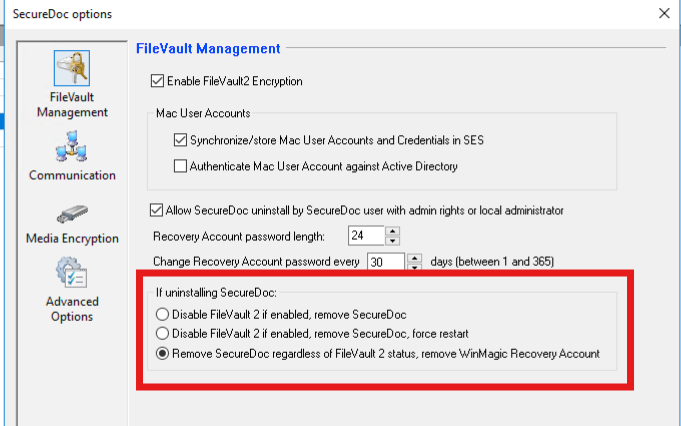
These must be specified beforehand in the relevant software package of the Mac installation under “FileVault 2 Management” in the “If uninstalling SecureDoc” section and also rolled out on the machines:
Option 1 - Disable FileVault 2 if enabled, remove SecureDoc.
The hard disk encryption is removed and the SD Recovery User is removed. The user must re-encrypt the hard disk using the native tools for FileVault 2. See “Important”.
Option 2 - Disable FileVault 2 if enabled, remove SecureDoc, force Restart.
Option 2 behaves like the first option, but forces the Apple device to restart completely after the hard disk encryption has been removed.
Option 3 - Remove SecureDoc regardless of FileVault 2 status, remove WinMagic Recovery Account.
Option 3 removes the SecureDoc client but leaves the FileVault 2 encryption active. The Securedoc account for the recovery keys is also removed. The user must know his user name and the corresponding password.
IMPORTANT:
NOTE: It’s highly recommended to extract the recovery key from SES before the uninstallation will be started. It looks like XX-XXXX-XXXX-XXXX
For reference please check the following external Website: https://www.macworld.com/article/231249/how-to-find-your-filevault-recovery-key-in-macos.html
In all three options, the SecureDoc Recovery User for recovering the password is omitted. During uninstallation, this account is rendered unusable and deleted in all three cases.
- The recovery key must be extracted from the operating system via the administrator account independently and on the customer's own responsibility, written down and stored securely.
Alternatively, the account must be connected to the iCloud or Apple Business and the recovery keys must be stored there. There might be other Options like e.g. JAMF & SOTI MobiControl/Intune - After uninstalling Securedoc, it is also important to ensure that other accounts that use the Apple device are configured correctly in terms of unlocking a FileVault 2 volume.
- After uninstalling Securedoc, WinMagic SecureDoc can no longer help the customer to restore the key as all corresponding references to the key, user and device have been removed from the SES.