Issue: During deployment, the installation fails due to driver compatibility test failing and may display one of the following error messages:
insmod: ERROR: could not insert module ./SDLinuxDrv.ko: Required key not available
insmod: ERROR: could not insert module ./SDLinuxDrv.ko: Operation not permitted
[ERROR] driver compatibility test failed
For example: 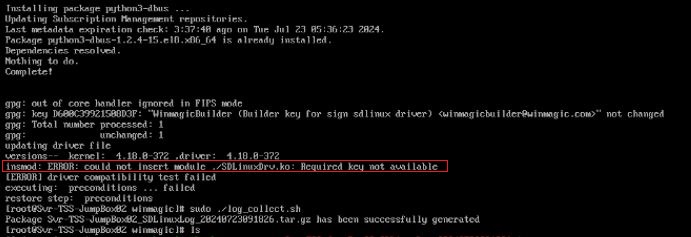
Cause: SecureBoot is enabled on the client machine BIOS
Solution: Disable SecureBoot on the client machine BIOS and then try to deploy SDLinux once more. Users can re-enable SecureBoot once encryption has been completed on the system.
"This information can also be found in the Appendix K of our SDLinux deployment guide:
https://downloads.winmagic.info/manuals/SD_Linux_Deployment_9.1.pdf
If the issue persists after disabling Secure Boot and rebooting the device, run the following command (to check for available system memory) and send to the support team below output and the kernel log:
cmd: free -m
cat /proc/meminfo
It is also recommended to perform the above actions from a fresh boot to capture initial available memory as the memory will be much lower."
2021 SDLinux [ERROR] driver compatibility test failed
- Updated on Feb 6, 2026
- 1 minute(s) read
- VN
Was this article helpful?