What is the minimum SQL Rights needed to run SDConnex for SDWeb?
Article Summary
This article provided additional information relating to SQL permissions which are needed to successfully run SDConnex for SDWeb.
Issue:
Client may notice the following pop message indicating that SDConnex Service failed to start as shown in the following error:
“Could not start service. Please check the Application event log.”
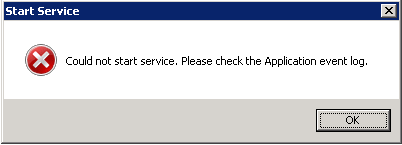
Upon reviewing the SDConnex Event log, you may see one of the following error(s) in which certain type of error could be generated in the event that only certain permissions were set when your SQL or Windows user only had db_datareader and db_datawriter rights to the database:
Failed to open the Database
System.Data.SqlClient.SqlException (0x80131904): The EXECUTE permission was denied on the object 'spSystem_GetVersion', database 'NCRSESWEB', schema 'dbo'.
Unable to start service broker
System.Data.SqlClient.SqlException: The specified schema name "dbo" either does not exist or you do not have permission to use it.
Unable to initialize CacheDependencyManager
System.Data.SqlClient.SqlException: The specified schema name "dbo" either does not exist or you do not have permission to use it.
Error when starting the service
System.TypeInitializationException: The type initializer for 'WinMagic.SecureDoc.SDServiceHost.CacheDependency.CacheDependencyManager' threw an exception.
Service cannot be started. System.TypeInitializationException:
The type initializer for 'WinMagic.SecureDoc.SDServiceHost.CacheDependency.CacheDependencyManager' threw an exception. ---> System.Data.SqlClient.SqlException: The specified schema name "dbo" either does not exist or you do not have permission to use it.
Product version affected:
SD 6.4 and up
Envrionment (OS/Software):
Reported OS:
- Windows 2008, Windows 2008 R2
- Windows 2012, Windows 2012 R2
- Windows 2016
Reported SQL:
- SQL Server 2008 / 2012
- SQL Server 2014 / 2016
Probable Cause:
The SQL or Windows user does not have enough SQL permissions required to run the SDConnex or SESWeb. The rights required are the minimum necessary to Execute, Create, Subscribe and Receive notifications for Stored Procedures, and the Service Broker.
Resolution 1(Recommended):
Please review - KB 1449 SQL Rights and Windows Managed Service Accounts which will provide instructions on how to grant the SQL or Windows user db_owner rights to the SES Database.
Resolution 2:
They may be certain environment situations in which it may be necessary to use the minimal rights to run the SDConnex and SESWeb. When this is required, then you can execute the included script called “SD_SESWebRole.sql” which can be run against the SES database to create a role called SD_SESWeb. This role can be assigned to your SQL or Windows user that is being used to run the SDConnex and ADSync services.
Before continuing, you will need to download the SD_SESWebRole.sql file which is included in this KB. Once completed, you can complete the following steps:
- Launch your SQL Server Management Studio
- Login to your Master Database
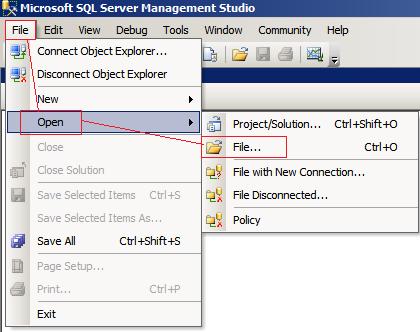
- Select File -> Open -> File…
Example:
- Navigate to the SD_SESWebRole.sql file which you download and then click Open
- Replace <SES Database> with the name of the SES Database.
- Click Execute.
The executed script will create a new SD_SESWeb role under the SES Database. To implement this role, you will need to add this to the SQL or Windows user that is used for the SDConnex.
- From SQL Server Management Studio:
- Expand on the + next to Security then Logins
- Locate your SQL or Windows User then, right click and select Properties.
- Select User Mapping
- Under User Mapping, select your SES Database listed under “Users mapped to this login”.
- Under the Database role membership for: “<SES Database>” put a checkmark next to “SD_SESWeb”
- Click OK
- Start the SDConnex
Embedded File Attached:
