What is the SecureDoc icon status and their meanings?
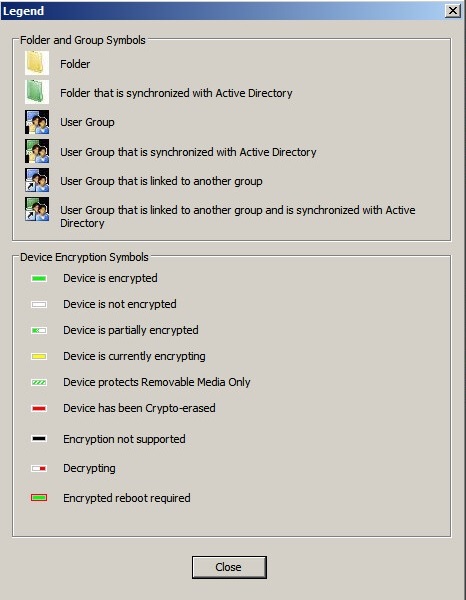
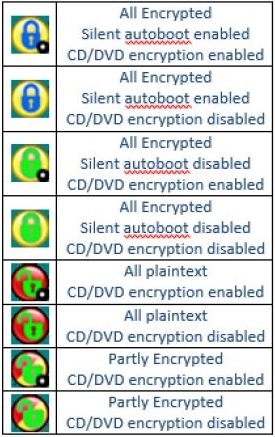
This article simply provides a quick overview of the icon legends and summary description of the current status of device:
Status Legend from SES Console Legend from SecureDoc Client device
Checking status via Windows Registry
It's also possible to check the current encryption status of a Client machine through the Windows Registry. You can perform a registry key search on each SecureDoc-protected client from the hive key
HKEY_LOCAL_MACHINE\SOFTWARE\WinMagic\DiskEncrypted
Alternatively, you extract and run the batch script (Encryption Status Script) included in this artice from your client machine.

In the following example, when you run the script, you will see a DOS Shell showing current status:
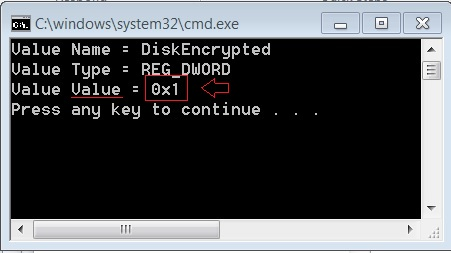
In the above example, the Value was 0x1 means the current status is Fully encrypted.
Status Values
DiskEncrypted = 1 [(0x1) Fully encrypted]
DiskEncrypted = 0 [(0x0) No encryption on computer]
DiskEncrypted = 2 ([(0x2) Partially encrypted]