SecureDoc V7.1SR4-protected devices running BitLocker and that have UEFI and TPM + SecureBoot enabled in BIOS and that have been upgraded to the Windows 10 Anniversary edition may fail to resume from hibernation.
Issue:
Windows 10 Anniversary Edition is unable to come out of Hibernate when system is encrypted with WinMagic V7.1SR4 managing BitLocker on UEFI systems having the combination of TPM and SecureBoot enabled in BIOS. A system crash could occur during machine resume operation or the system can stuck in resume and needs a hard shutdown/power off.
This will cause any unsaved work to be lost.
Product version affected:
7.1SR4
Environment (OS/hardware/software):
Windows 10 Redstone/Anniversary Edition
System that have UEFI Enabled +SecureBoot +TPM configured
Hibernate/Hibernation
Root Cause:
Windows 10 Anniversary Edition will automatically prepare Bitlocker activation during OS installation if TPM+SecureBoot are enabled in BIOS.
This can cause systems that are encrypted with software encryption ( SecureDoc native encryption) to fail resume hibernation
To verify if Bitlocker is enabled on your systems navigate to Control Panel > System and Security > Bitlocker Drive Encryption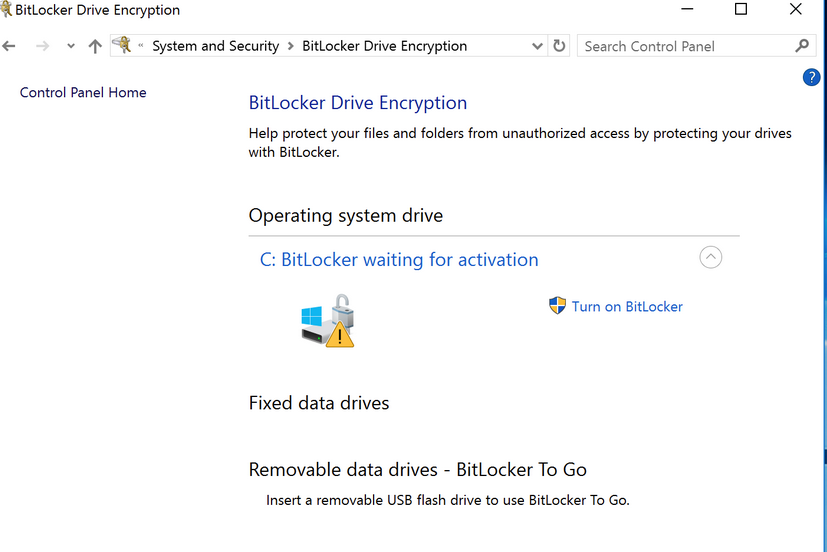
Following check can be performed via Windows Power Shell
c:\windows\System32\manage-bde -status c:
and verify if C: is encrypted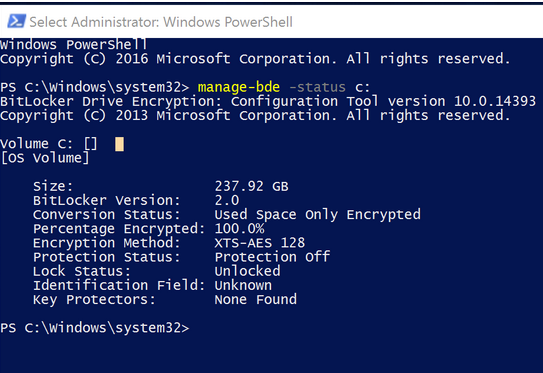
Workaround:
To resolve this issue alternative command can be executed from Windows Power Shell to deactivate Bitlocker encryption.
This can only be applied on Systems running SecureDoc profile that does not manage or take ownership of Bitlocker activated systems
The command below will remove activation, with no need to decrypt or remove WinMagic Securedoc prior to this
manage-bde -off c:
Let the decryption finish and reboot the system
Reference:
SD-20298\SD-20226
Search keywords Surface pro 4 , SurfacePro 4 , Windows 10 , Redstone 1 , Anniversary Edition , Hibernate , Hibernation, resume, resumption