Affects versions 4.9 and later.
How SecureDoc uses certificates
SecureDoc as disk encryption software relies on modern strong algorithms to encipher and decipher information on hard drives and other media. These algorithms require a set of keys, which are provided for users by SecureDoc in a special object, named "key file". The Key file is also protected by encryption. At this stage another key, also called a Key Encryption Key (KEK), is required by users to successfully authenticate. Certificates are secure sources of keys for this purpose as they provides a pair of asymmetrical keys appropriate for encryption and decryption operations. SecureDoc encrypts sectors of hard drives, USB drives, CD/DVD, using a Data Encryption Key (DEK), which uses an AES 256-bit approved algorithm. The certificate is used to protect these keys.
SecureDoc software requires that users keep their certificates on approved Smart Cards (referred to from this point on as tokens). Certificates or public keys will be read from tokens and information will be passed to tokens to be decrypted with a certain private key.
How PKI is used in SecureDoc:
·When Key files are created for users they are protected by the individual user’s certificate.
·The certificates can be found on the user’s token, as .pfx (PKCS12) or .pc7 (PKCS7) files, local Windows Certificate Store, and Active Directory or other PKI database. SecureDoc Enterprise Server (SES) imports the certificates to be used during deployments.
·The public key from the certificate is used to encrypt information in the key file. The modulus of that public key is kept available in the key file.
·Later when the encrypted information from key file is needed to access a hard drive, the user has to insert a token with the corresponding private key inside. The token is used to decrypt information passed to it with the private key matching the modulus kept in the key file.
User certificates in SES
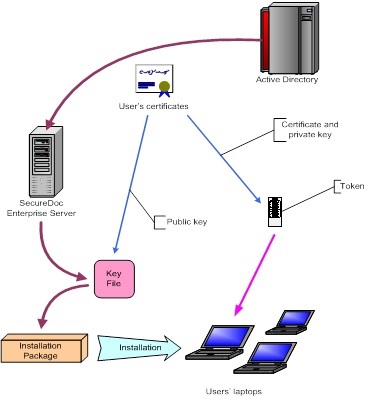
The diagram below shows how PKI is applied in the SecureDoc Disk Encryption solution. Certificates are imported into SES from Active Directory (or a PKI database), and are then used to protect each users Key File during the installations. The end result is that the user has to authenticate to the token that contains his/her own certificate and the corresponding private key:
Key points:
·The users' certificates are imported from Directory Service or PKI through LDAP and then into the SES database
·When the installation package is created for the deployments, the key file protection applied will use the certificates contained in the user’s records in SES.
·During the installation, each user’s key file will be protected with the public key from his/her own certificate.
·When the installation and encryption on the computer has finished, in order to log into the computer at pre-boot, the user must authenticate to their token that contains the user’s certificate and the corresponding private key.
SecureDoc requirements for user’s certificate
From v4.0, SecureDoc enforces specific policies on certificates used for key file protection.
The certificate must not have expired.
The certificate should contain appropriate Key Usage attributes. SecureDoc consider a certificate appropriate for encryption if the Key Usage value includes Data or Key Encipherment or both.
Key size should be 1024 - 4096 bits.
The certificate taken from file should be in DER-encoded format.
The certificate has to comply with the X.509 v3 standard.
All requirements may be checked by opening the certificate (from .cer / .crt file or through certificate store) in Windows and looking at the Details tab.
If any one of the requirements above is not satisfied then the certificate cannot be used for key file protection. SD Key Management/Change Password Dialog displays an error if the user tries to use such a certificate.
WinMagic does not recommend integrating PKI without hardware tokens. According to NIST, 256-bit AES encryption utilized by SecureDoc is equivalent to 15000-bit RSA in terms of security level. Current PKI at 2048 or even 4096-bit RSA will theoretically weaken SecureDoc protection systems. The security benefit only comes with the use of hardware tokens.
Testing certificates imported from Active Directory (or PKI database)
In SES, the users' certificates are imported into the database first and used to protect key files.
Fixing such an issue might require rolling back or manually patching all installations done at enterprise level, which may be hundreds or even thousands if the installation was performed via File Distribution Software like SMS, etc.
To prevent such situation in v.4.2 each certificate imported into SES database is checked against the requirements stated above. SES also prevents a corrupted certificate from being put into the database.
The message shown with the error code explains why a particular certificate was rejected.
The Key File Concept
The Key File object is created for all users during the installation. A Key File can be protected using a strong password, or 2 or 3 factor authentications. 2-factor authentication requires a smart card and 3-factor authentication requires a smart card and a fingerprint.
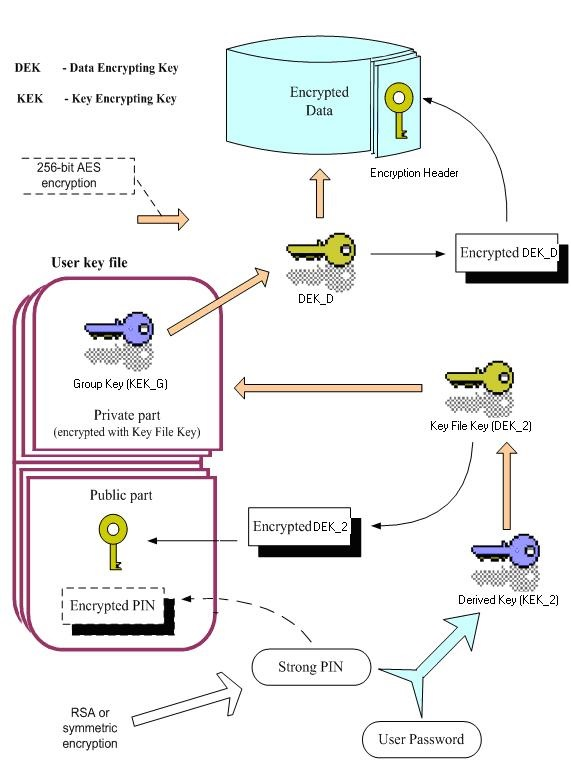
SecureDoc encrypts hard drives, removable media, CD/DVD, etc. using unique AES encryption keys (DEKs). All users' AES keys (DEKs) are protected by their own certificates (KEKs).
Therefore, to successfully log into an encrypted computer, a user must decrypt their DEK by authenticating to the token that contains the certificate that was used to encrypt it. This happens at pre-boot.
Key points:
·The computer’s data (hard drives, removable media, etc.) are encrypted using an AES encryption key (or the DEK).
·The AES keys are encrypted using the user’s certificates (or the KEK).
·The user’s certificates (public/private keys) are saved securely on smart cards (tokens).
·In order for users to log into an encrypted computer, they must authenticate to their tokens at pre-boot. The certificate on the token is used to decrypt the DEK - only then can the computer start.
The diagram below shows how a Key File is protected and authenticated to using both a strong PIN and a certificate:
Key File Labeling
SecureDoc labeling can be used to help administrators identify which data has been encrypted by the key. This helps new administrators when they have to decrypt data. All AES (DEK) are stored securely in SecureDoc Enterprise Server in an SQL DBMS backend.
With the same labeling technique, you can share data among users, among groups, among departments or even enterprise-wide. All labels stay intuitive and human readable, and secure.
Key labeling is applied to SecureDoc full disk encryption, SecureDoc container encryption, SecureDoc File/Folder encryption, and even for database records or any SecureDoc encrypted data objects.
In fact, key labeling is not unique at all to SecureDoc. It is the standard used in, for example, email encryption where the recipient name is the label. But it is unique in the disk encryption field because disk encryption has not been in the mainstream until now. With the popularity of disk encryption, it is becoming apparent that SecureDoc’s use of Open Standards makes it the closest to the ideal standard disk encryption. Key Labeling is part of SecureDoc's unique architecture and design.
Custom Fields
Article ID: TS0049
Product_Documentation: Yes
Version: SecureDoc 4.9, SecureDoc 5.0, SecureDoc 5.1, SecureDoc 5.2, SecureDoc 5.3 SR1