Issue:
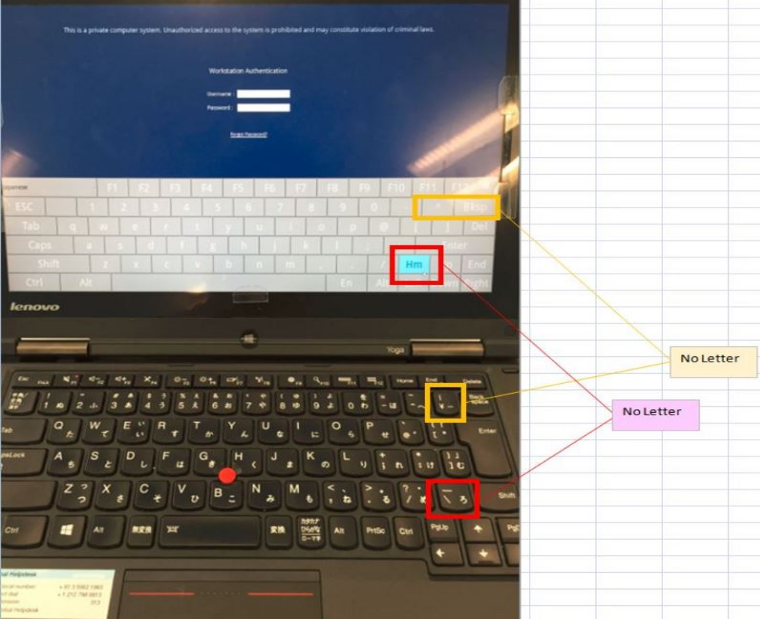
This article addresses a limitation which may cause issues for customers using devices having a Japanese keyboard. When using the “Yen” ¥ symbol or the “/” forward slash symbols to in a User Name or in a Password, then during Pre-Boot Authentication (PBA) the device will not respond in the UEFI environment and the user will not be able to log in with those credentials.
Symptom:
It appears that the specific keys such as the "Yen Symbol" and “/” do not work at PBA.
Product version affected:
6.5 SR3 HF1 (6.5.3.210)
Environment (OS/hardware/software):
Lenovo X1 Carbon 3rd Generation (MTM: 20BT) and Yoga 12
UEFI devices
Windows 8(.1) and 10
Informational Gathering and Troubleshooting:
Obtain the sdprofile.spf
Obtain the userdata folder which contains all of the logs from the device
Screenshot of the keys on the keyboard that were used.
Resolution:
At this time, we do not support “/” and ” Yen” ¥ characters at PBA. Users should be notified that the use of these symbols is not valid within either the User ID or the Password, and they must be directed to avoid their use in either of these fields.
Limitation:
This issue is due to the vendor hardware and firmware limitations.
The BIOS vendor designed the BIOS for these systems with the intended US Keyboard in mind only.
There is also a limitation with EFI as the BIOS maker cannot specify keyboard languages.
Internal Reference:
https://jira5.winmagic.local/browse/SD-16062
SF: 68680