Title:
Supporting Devices with Intel's SkyLake Microarchitecture using SD version 7.1 SR1
Summary:
This article addresses support for devices equip with Intel's SkyLake systems with specific settings in order to successfully install SD 7.1 SR1.
SD 7.1 SR1 is the first release to support Intel's Skylake systems . Therefore, some limitations exist which are discussed below and should be carefully reviewed before installing SD.
Product Version Affected:
SD 7.1SR1
Environment:
Windows 7 OS using Preboot Loader (PBL)
Windows 8.x using UEFI/PBLU (Linux Preboot UEFI Loader)
Windows 10
Recommendations/Workaround:
Please ensure the following settings are enabled prior to installing SD 7.1 SR1 on SkyLake devices:
- Windows 7 OS using Preboot Loader (PBL), the Y-Mode should be set to 40 in the profile. (By default Y mode is 0).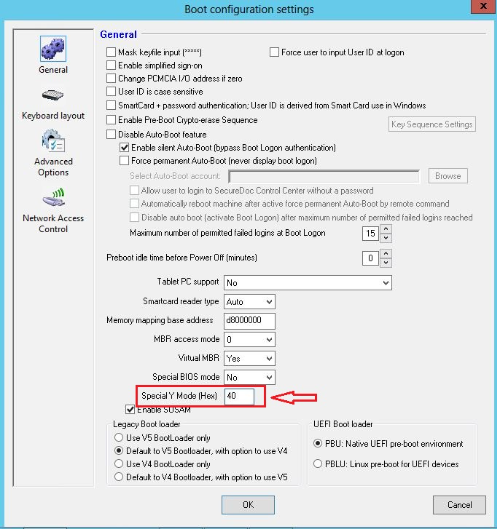
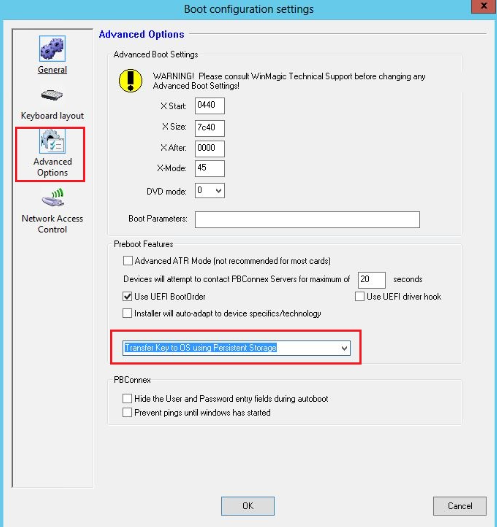
- Windows 8.x using UEFI/PBLU (Linux Preboot UEFI Loader), and the Persistent Mode (OS Storage) should be enable in the profile.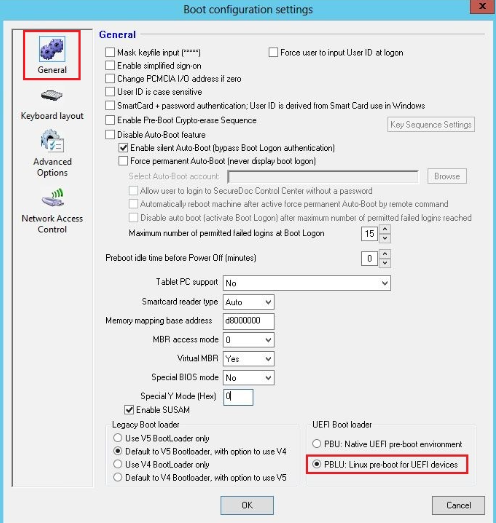
NOTE:
- By enabling the option "Transfer Key to OS using Persistent Storage" allows for the key to be store on the hard driver instead on the RAM memory.
- The Y mode option will be resolved in SD 7.3.
Security Implications of Ymode=40
Pre-Boot Authentication operates in an environment in which transfer of disk encryption key or other data can be challenging. SecureDoc YMode=40 means the data transfer will occur via the disk. Even though the data is obfuscated before being written to the disk and is deleted after being used, it may be vulnerable.
This configuration is only applied to 7.1SR1
Under SecureDoc V7.1SR2 and higher, systems can work "out of the box" using SecureDoc's PBU (preboot UEFI) or PBLU pre-boot environments, but it is important to note that every device works the same, so special configurations must be applied or found.