Why am I getting Blue Screen Error "IRQL_NOT_LESS_OR_EQUAL". Symantec AV can cause reboot problems after SD installation
Scenario:
Symantec End-Point Protection prevents successful SecureDoc installation leading to the blue screen error "IRQL_NOT_LESS_OR_EQUAL".
Symptom:
The first time SecureDoc is installed on a Windows client that is running Symantec End-Point Protection, it causes a blue-screen halt (BSOD).
After a reboot, the software then installs fine. The blue screen halt occurs during the very initial installation (before the .dll's are replaced).
The blue screen error is "IRQL_NOT_LESS_OR_EQUAL".
On the face of it, this behavior is similar to what happens where a blue screen error is caused by a device or driver incompatibility.
Probable Causes:
Symantec End-Point Protection detects SD files as intrusions or as low level viruses on the drive, essentially blocking the SDService.exe from running.
Then it would proceed to restore the default Windows MBR, which will remove the necessary SecureDoc integration into the MBR.
This may lead to a Windows BSOD, or the system will not be able to Boot into Windows.
Product version affected:
1. Issue does not happen with SD 6.4 and Symantec 12.1.3xxx and above
2. Issue does not happen with SD 6.4SR1 and Symantec 12.1.1xxx
Environment (OS/hardware/software):
Symantec 12.1.3xxx and above
Multiple devices
Windows 7 and 8
Resolution:
Solution 1:
It is a recommended “Best Practice” to disable/uninstall Symantec Anti-Virus prior to installing SecureDoc client software. This will allow for a successful SD installation and conversion.
Given the unpredictable behavior(s) of any particular AV product during the installation of SecureDoc Client (which includes driver-level components) can be impossible to determine - particularly from one AV product to another AV product, or version to version.
NOTE: If there are still reoccurring issues following the re-enabling of Symantec Anti-Virus, please proceed to solution 2.
Solution 2:
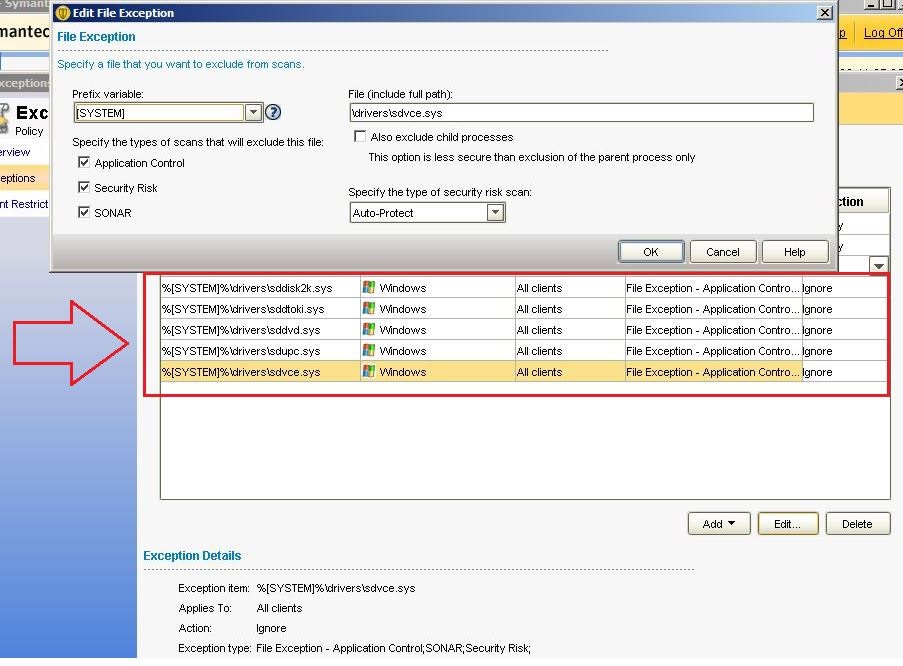
Add the following list of SD executable files to Symantec End-Point Protection File Exception List (White List).
Symptoms | Antivirus Software | White Listing Files |
SD-9563 | Symantec End-Point Protection Management Version Symantec 12.1.4xx or newer | Please add all SecureDoc drivers located System32\drivers\ including the folders 1. sddisk2k.sys 2. sddtoki.sys 3. sddvd.sys 4. sdupc.sys 5. sdvce.sys |