ingSES Web Administrators unable to add Users or Keys after Upgrade to SES 9.0 SR3+
Purpose
This article explains why SDWeb administrators or helpdesk staff may lose the ability to add users and keys to devices after upgrading SecureDoc Enterprise Server (SES) to version 9.0 SR3 or later and provides steps to restore the required permissions.
Applies To
Product: SES Web 9.0 SR3 and later
Components: SDWeb Console, Administrator Roles
Issue
After upgrading SES to 9.0 SR3 or newer, some administrators may find that they can no longer:
Add users to devices
Add keys to devices
This affects SDWeb administrators and helpdesk personnel who previously performed these tasks without issue.
Cause
SecureDoc 9.0 SR3 introduced a new administrative permission. Roles that existed prior to the upgrade do not automatically receive this new right, resulting in restricted functionality.
Resolution
1. Log in as a Root Administrator or SDWeb Admin
Use the root admin account or another SDWeb administrator with full rights.
2. Navigate to Role Management
In the Web Console:
Configuration > Administrator Management > Manage Roles
3. Enable the Required Permission
Within the selected role:
Scroll through the Rights list
Enable Manage Authentication to Remote Devices
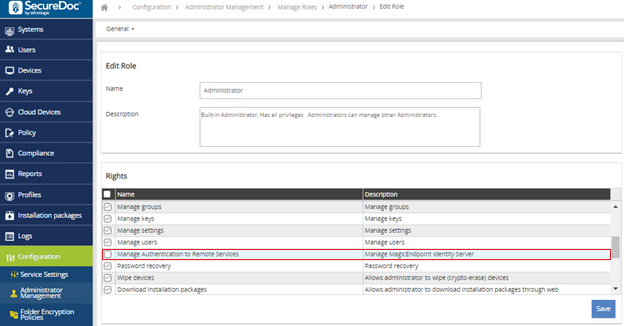
Click Save
4. Have the Affected User Re‑Authenticate
Ask the administrator or helpdesk user to:
Log out of the Web Console
Log back in
They should now be able to add users and keys to devices.
Additional Notes
If your helpdesk team routinely adds users or keys as part of their workflow, ensure this permission is added to their assigned SES Web role.
This change must be applied manually for any custom roles created prior to upgrading to SES 9.0 SR3.