Affected Version:
SecureDoc SES
Environment:
ADSync enabled
Used Case Summary:
A reasonably large customer had a disastrous situation at where they inadvertently removed their ADSync configuration which resulted in many users being deleted from their systems and resulting in massive amounts of technical support calls.
While, the product was acting as designed (ADSync set to move users to recycle bin combined with SES option to delete users from devices when moved to recycle bin) it was made clear that the design allows for one mistake to have massive effect in the environment.
The Cause:
An administrator went to AD Sync Service and mistakenly removed some of the OU folder that is being sync.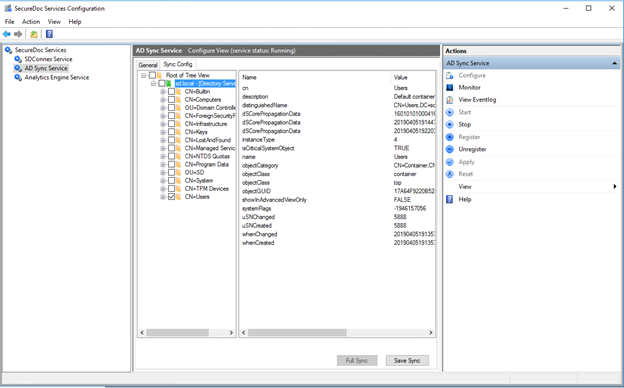
When the admin clicked Save Sync and Full Sync it immediately started removing the users. That removal is triggered by the ADSync configuration option under the general tab which is set by default to “move deleted users to the Recycle Bin” as shown below: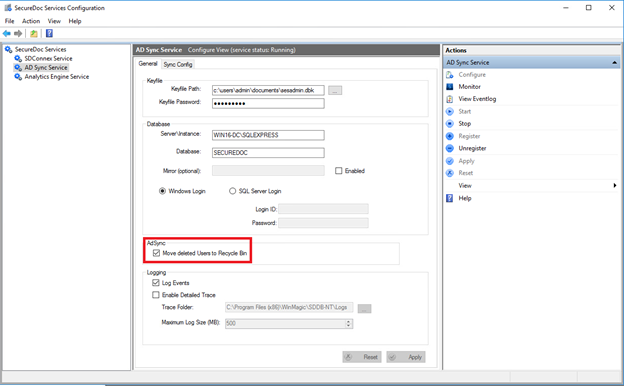
Because ADSync is now configured to no longer sync the AD OU folder that the customer mistakenly unchecked, it will remove those folders from the sync tree (green folders in SES) and move the users to the recycle bin.
By default, in the Global Options under SES->Tools Menu -> Options -> General there is an option to remove users from their associated device(s) when the users are moved to the Recycle Bin. As shown below: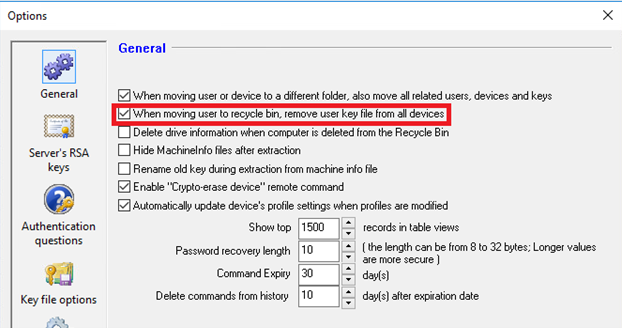
When this option is set and combined with the ADSync option to move the users to the Recycle Bin, this combination will trigger commands to cause all of these users to be deleted from their devices.
The Effect:
The problem may not be readily apparent, because the affected users will not know that they are no longer cached on their computer until they restart the device and can no longer login. In addition, Challenge Response will not work because the Key File has been completely removed from the device.
Factors:
The user and device are remote, so that network access is most likely not available at pre-boot.
If the users and devices are in the office, they can leverage Pre-Boot networking and they could have the user login with their AD Credentials at Pre-boot and log back into Windows. This would then cache their user account back on the device (after the admin has corrected the ADSync config and has restored the users from the recycle bin on SES)
No last resort SecureDoc account on the device.
The only mitigation is to bring the computer into a corporate office where they can connect to pre-boot networking.
Summary:
We need to be clear and careful when looking at customers’ existing ADSync setup because we do not want to start recommending that customers make changes which will potentially cause users to get removed from the devices. IF ADSync changes must be made, make sure to disable the option in SES global options first. If a customer mistakenly checks incorrect boxes when looking at the ADSync config, simply have the customer close out the MMC and reopen it.
Mitigation Steps:
Scenario: When the issue is discovered right away:
First stop SDConnex as soon as possible
Login to SQL and run the clear out all the pending commands related to deleting users:
DELETE FROM dbo.commands WHERE command = '/M' AND Status = 1
Do Challenge Response to get the users back in if the device has a last resort account.
OR
Connect the devices back on the network and use PBN to get the user through the first time.
Prevention:
Scenario: If a customer mistakenly opens ADSync Services -> Sync Config and clicks the checkboxes to select their whole domain and they want to back out of that we need to:
Close out MMC panel. Do not click Apply or Save. This will reset back to square one.
Recommendation:
Create backdoor Last Resort account (SES specific account with 32 random Password) with no rights so that it does not have modify password right. Put the account on every device. Since it is not an AD account that cannot be used to compromise the Windows login if the password was breached. The password is randomized and cannot be change by any user and not going to brute force a 32-character password. Utilized the user account for Challenge Response.
Make sure that the “All Device” and “All User” groups do not have any privileges assigned, (Modify Password is assigned by default and must be removed)