Issue:
Customers wishes to cease use of MBAM, and to use SES instead to manage existing BitLocker-encrypted devices. Ideally, this should not require decryption of these devices and subsequent re-encryption under SecureDoc.
Solution:
This process is very simple:
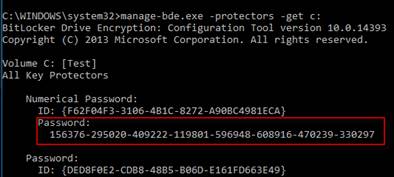
1. Save the Recovery Password (in case the device goes into Lockdown mode). NOTE: This Recovery Password can also be retrieved by running: manage-bde -protectors c: -get
2. Uninstall the MBAM agent on the affected device(s) client.
3. Install SecureDoc which will take over control and centrally manage these devices. No decryption/re-encryption are required.
Image below is an example of what the result from manage-bde -protectors c: -get looks like on the screen.