1031 - How SecureDoc uses certificates
SecureDoc uses encryption keys to protect data on hard drives and removable media. A Data Encryption Key (DEK) encrypts the data with AES-256 encryption. Each user also has a Key File that stores the keys needed to access encrypted data. The Key File is protected by a Key Encryption Key (KEK). SecureDoc can use the public and private keys in a certificate like KEK.
SecureDoc requires users to store their certificates on approved smart cards or other hardware tokens. SecureDoc reads the public certificate from the token and sends protected information to the token, where the matching private key decrypts it.
How SecureDoc uses PKI
Each user’s Key File is protected by their certificate. SES can import certificates from a hardware token, certificate file, Windows Certificate Store, Active Directory, or another PKI database.
During deployment, the certificate’s public key protects the Key File. To start the encrypted computer, the user inserts the token that holds the matching private key and authenticates at pre-boot. The token then unlocks the protected Key File information.
User certificates in SES
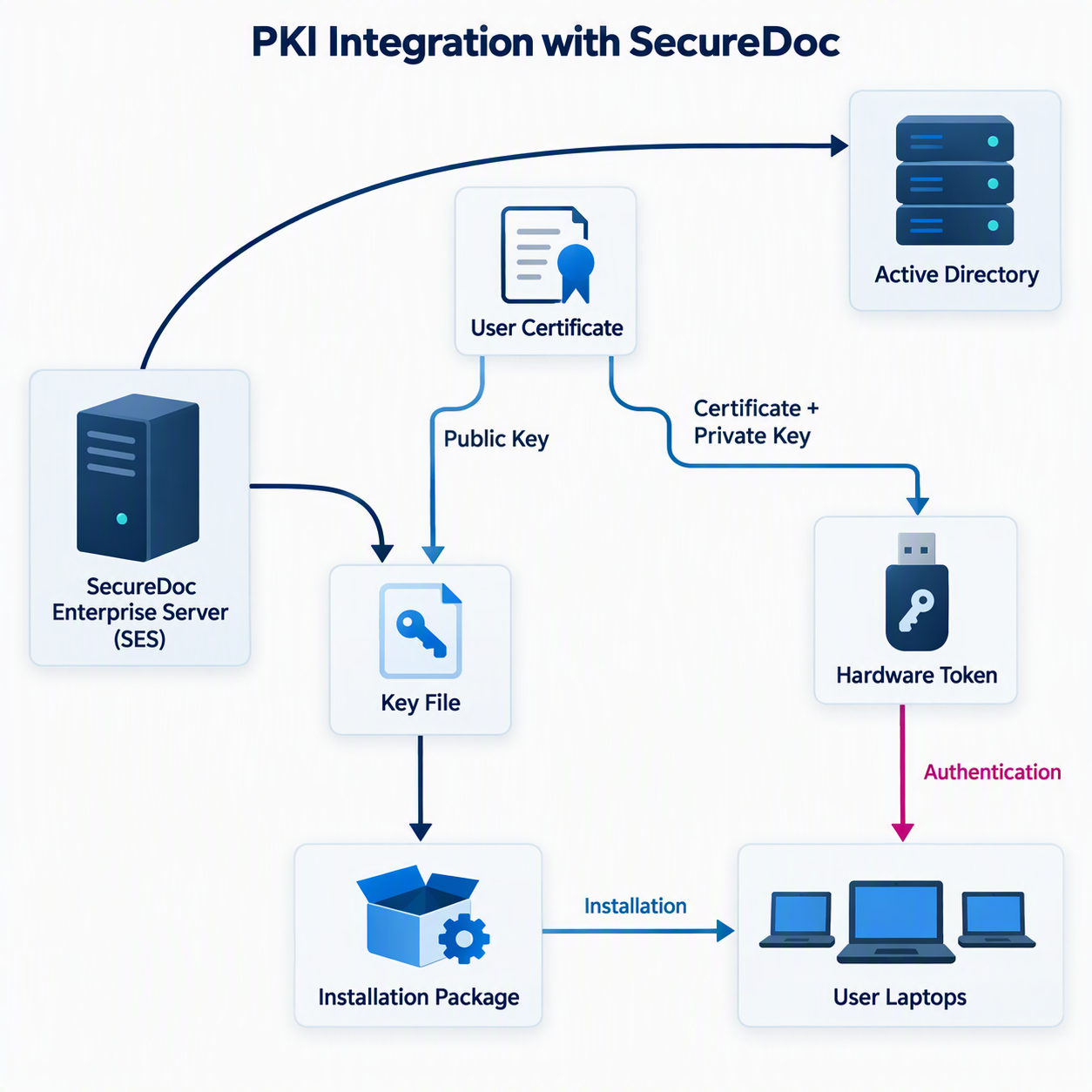
The diagram below shows the basic process. SES imports each user’s certificate from Active Directory or another PKI source and uses it to protect that user’s Key File. The user must then authenticate with the token that contains the certificate and matching private key.
Key points:
SES imports user certificates from Active Directory or another PKI source through LDAP.
When an installation package is created, SES uses the certificate in each user’s record to protect that user’s Key File.
During installation, the public key in the user’s certificate protects the Key File.
After installation and encryption are complete, the user must authenticate with the token containing their certificate and private key to log in at pre-boot.
SecureDoc requirements for user’s certificate
A certificate must meet the following requirements before SecureDoc can use it to protect a Key File:
The certificate must not have expired.
Its Key Usage must include Data Encipherment, Key Encipherment, or both.
The key size must be between 1,024 and 4,096 bits.
A certificate imported from a file must use DER encoding.
The certificate must comply with the X.509 v3 standard.
To check these settings in Windows, open the certificate and select the Details tab.
If a certificate does not meet every requirement, SecureDoc cannot use it to protect a Key File. The SD Key Management/Change Password dialog displays an error when a user selects an unsupported certificate.
WinMagic recommends using hardware tokens for PKI integration. AES-256 provides a stronger theoretical security level than commonly used 2,048-bit or 4,096-bit RSA keys, so the hardware token is important because it keeps the private key protected.
Testing certificates from Active Directory (or PKI database)
SES checks certificates before using them to protect Key Files. This helps prevent certificate problems from affecting many computers after deployment.
If a certificate is damaged or does not meet the requirements, SES blocks it from being added to the database and displays the reason.
The Key File Concept
SecureDoc creates a Key File for each user during installation. The Key File can be protected by a strong password, a smart card, or a smart card plus fingerprint authentication.
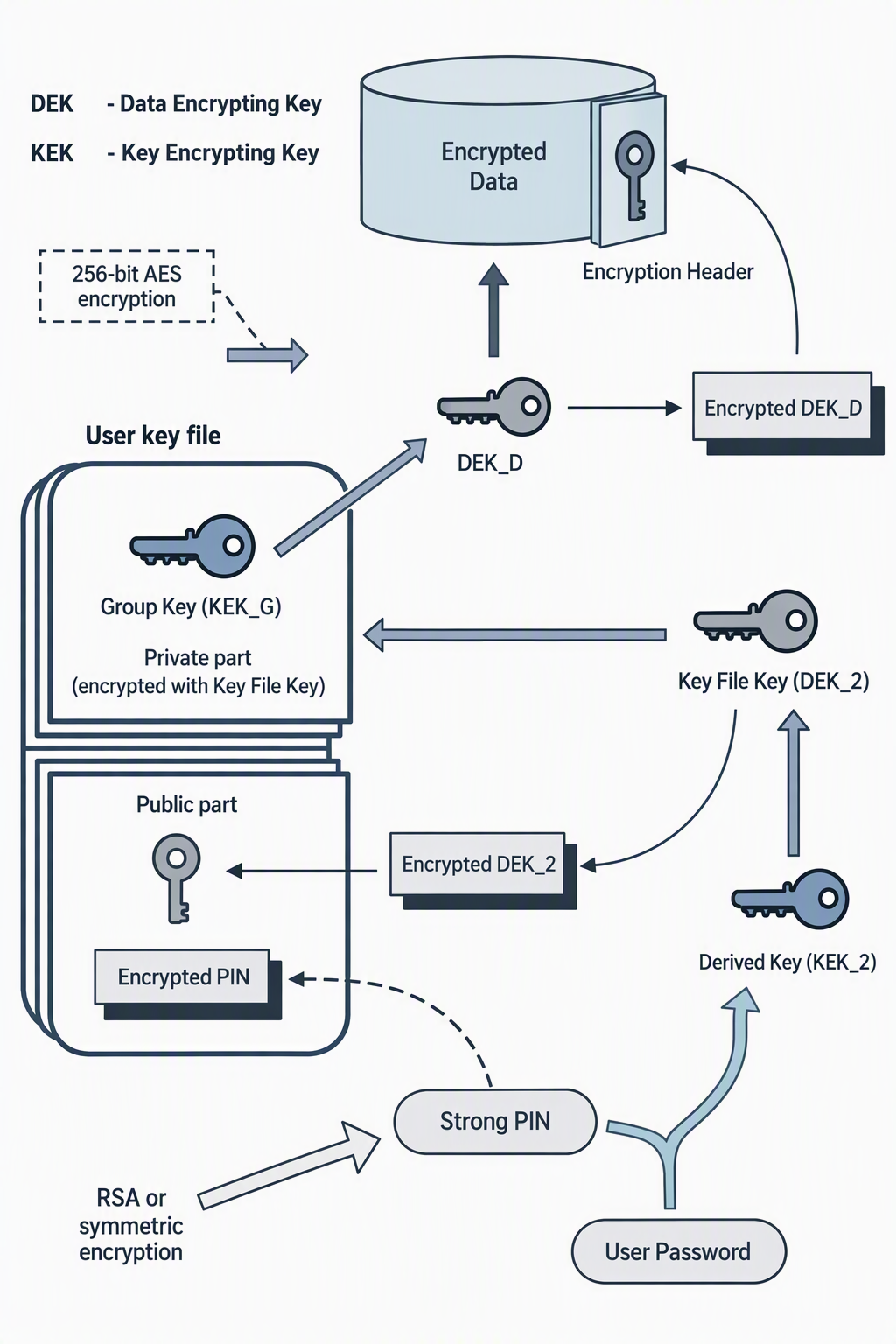
SecureDoc uses a unique AES Data Encryption Key (DEK) to encrypt each drive or removable device. The user’s certificate protects the DEK. At pre-boot, the user authenticates with the token that contains the certificate and private key. This unlocks the DEK so the computer can start.
Key points:
A Data Encryption Key (DEK) encrypts the data on hard drives and removable media.
The public key in the user’s certificate protects the DEK.
The certificate and its private key are stored securely on the user’s hardware token.
At pre-boot, the user authenticates with the token. The private key on the token unlocks the DEK, allowing the computer to start.
The diagram below shows how a strong PIN and certificate protect and unlock a Key File.
Key File Labeling
SecureDoc labels identify which key encrypted specific data. This helps administrators find the correct key when they need to decrypt it. All AES Data Encryption Keys (DEKs) are stored securely in the SES SQL database.
Labels also make it easier to share encrypted data with a user, group, department, or the entire organization. SecureDoc uses key labels for disk, container, file, folder, and database encryption.