Title: High Availability SQL Cluster
What is Windows Server Failover Clustering with SQL Server?
A Windows Server Failover Cluster (WSFC) is a group of independent servers that work together to increase the availability of applications and services. SQL Server takes advantage of WSFC services and capabilities to support Always On availability groups and SQL Server Failover Cluster Instances.
What is Always On Failover Cluster Instances?
As part of the SQL Server Always On offering, Always On Failover Cluster Instances leverages Windows Server Failover Clustering (WSFC) functionality to provide local high availability through redundancy at the server-instance level-a failover cluster instance (FCI). An FCI is a single instance of SQL Server that is installed across Windows Server Failover Clustering (WSFC) nodes and, possibly, across multiple subnets. On the network, an FCI appears to be an instance of SQL Server running on a single computer, but the FCI provides failover from one WSFC node to another if the current node becomes unavailable.
An FCI can leverage Availability Groups to provide remote disaster recovery at the database level. For more information, see Failover Clustering and Availability Groups (SQL Server).
What is Always On availability groups?
The Always On availability groups feature is a high-availability and disaster-recovery solution that provides an enterprise-level alternative to database mirroring. Introduced in SQL Server 2012 (11.x), Always On availability groups maximizes the availability of a set of user databases for an enterprise. An availability group supports a failover environment for a discrete set of user databases, known as availability databases, that fail over together. An availability group supports a set of read-write primary databases and one to eight sets of corresponding secondary databases. Optionally, secondary databases can be made available for read-only access and/or some backup operations.
An availability group fails over at the level of an availability replica. Failovers are not caused by database issues such as a database becoming suspect due to a loss of a data file, deletion of a database, or corruption of a transaction log.
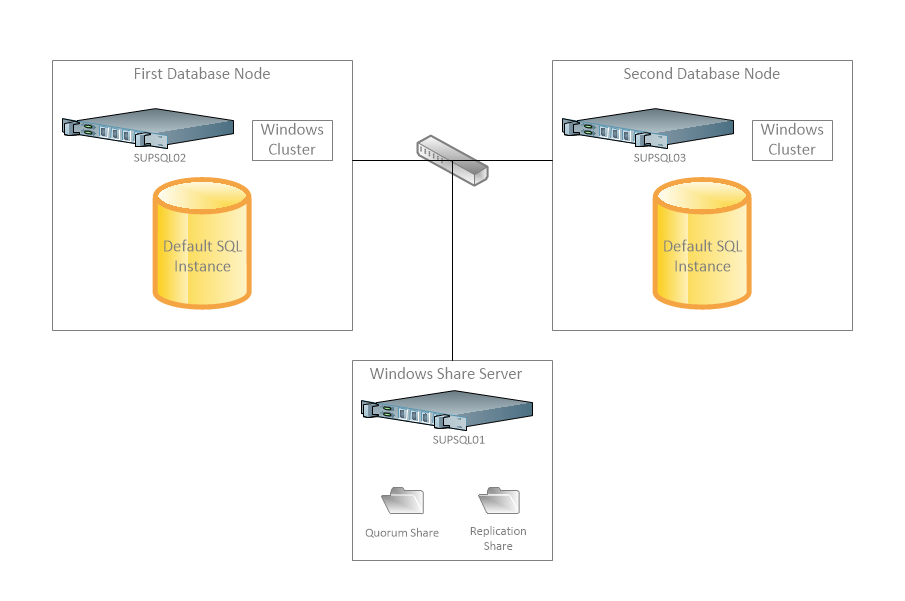
Example: The Support SQL Cluster contains 3 machines. SUPSQL01, SUPSQL02, and SUPSQL03. These machines are running Windows Server 2012 R2 Standard. The cluster itself is SUPSQL02, and SUPSQL03. These 2 machines are running SQL Server 2014 Enterprise. SUPSQL01 contains the Quorum file share for the Windows Fail Over Cluster configuration, and the Replication share for the SQL Availability group.
Summary:
- WinMagic has not tested High Availability SQL cluster for SecureDoc Database.
- If customers choose to use this configuration, they may run into issues in terms of performance.
- If customers choose to use this configuration, they may run into issues in terms of being able to upgrade, and they will likely have to “break” the HA cluster and copy the database the other members of the cluster after upgrading it.