Doc Enterprise Server

How to create an Ivanti Endpoint Manager distribution package for a SecureDoc silent installation
Application Guide
©Copyright 1997 - 2019 by WinMagic Inc. All rights reserved.
Printed in Canada
Many products, software, and technologies are subject to export control for both Canada and the United States of America. WinMagic advises all customers that they are responsible for familiarizing themselves with these regulations. Exports and re-exports of WinMagic Inc. products are subject to Canadian and US export controls administered by the Canadian Border Services Agency (CBSA) and the Commerce Department’s Bureau of Industry and Security (BIS). For more information, visit WinMagic’s web site or the web site of the appropriate agency.
WinMagic, SecureDoc, SecureDoc Enterprise Server, Compartmental SecureDoc, SecureDoc PDA, SecureDoc Personal Edition, SecureDoc RME, SecureDoc Removable Media Encryption, SecureDoc Media Viewer, SecureDoc Express, SecureDoc for Mac, MySecureDoc, MySecureDoc Personal Edition Plus, MySecureDoc Media, PBConnex, SecureDoc Central Database, and SecureDoc Cloud Lite are trademarks and registered trademarks of WinMagic Inc., registered in the US and other countries. All other registered and unregistered trademarks herein are the sole property of their respective owners. © 2014 WinMagic Inc. All rights reserved.
Acknowledgments
This product includes cryptographic software written by Antoon Bosselaers, Hans Dobbertin, Bart Preneel, Eric Young ([email protected]), and Joan Daemen and Vincent Rijmen, creators of the Rijndael AES algorithm.
This product includes software developed by the OpenSSL Project for use in the OpenSSL Toolkit (http://www.OpenSSL.org/).
WinMagic would like to thank these developers for their software contributions.
Contacting WinMagic
WinMagic 5600A Cancross Court Mississauga, Ontario, L5R 3E9 Toll free: 1-888-879-5879 Phone: (905) 502-7000 Fax: (905) 502-7001 | Sales: Marketing: Human Resources: Technical Support: For information: For billing inquiries: |
Table of Contents
SecureDoc silent installation package settings 5
Creating an Ivanti/LanDesk distribution package 6
Distribution Package - Scheduled Task 13
Introduction
This setup reference will provide a walk-through for creating an Ivanti Endpoint Manager distribution package, for a SecureDoc client silent installation.
Considerations
- This guide has been successfully executed on an Ivanti Endpoint Manager version 11.0.1505.
- The Ivanti Endpoint Manager server is already fully configured and provisioned in the customer organization infrastructure.
- A SecureDoc Enterprise Server is already fully configured and provisioned in the customer organization infrastructure.
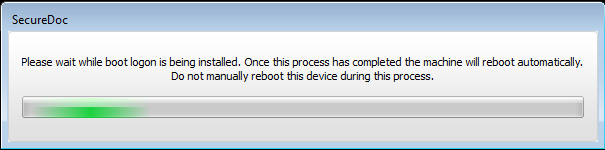
- Although this document contains instructions for a silent deployment, there is a splash screen the end-user will see during the installation. This screen is necessary so that the end-user is aware that they should not restart or shutdown their device during this process. Once the boot logon is installed, the screen will close.
- As with any product, please ensure no Windows updates are pending as this can disrupt the installation process.
SecureDoc silent installation package settings
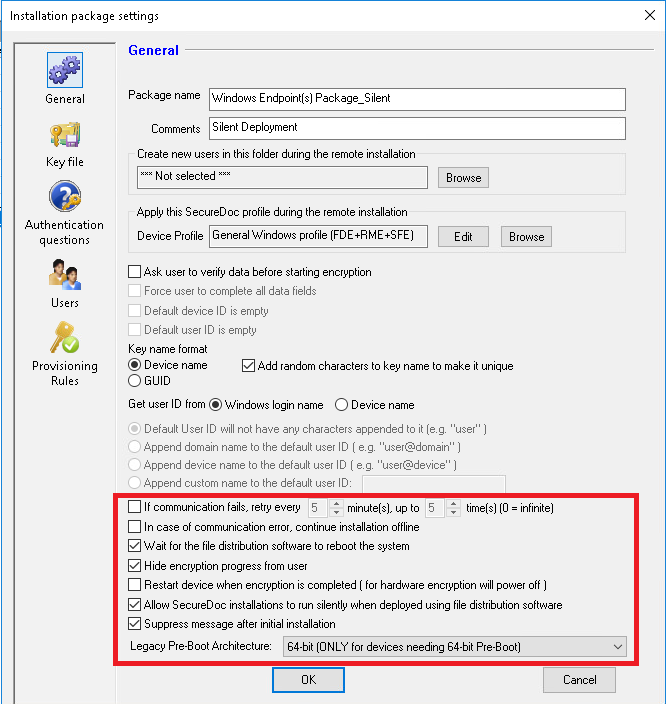
- General - Please make sure these settings are enabled.
Creating an Ivanti/LanDesk distribution package
Considerations:
At this point, the entire SecureDoc installation package either was already copied on the Ivanti Endpoint Manager, or it can be reached as a folder share. The following is based on a UNC shared folder approach.
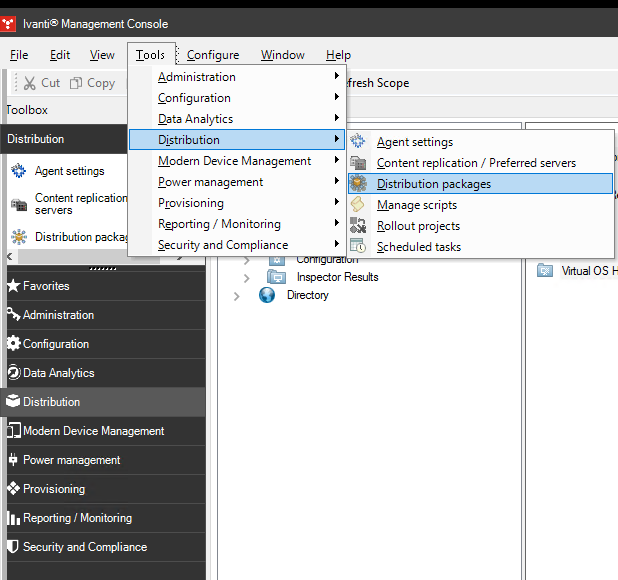
- Open Ivanti Management Console, and navigate to upper menu Tools -> Distribution -> Distribution Packages.
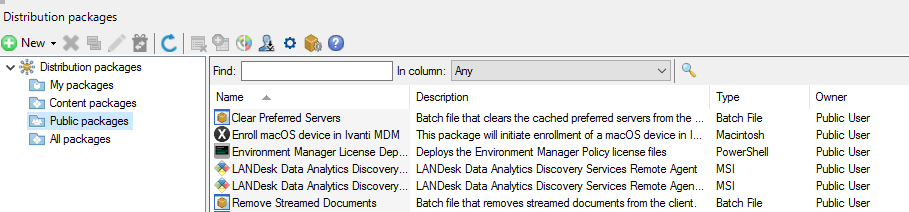
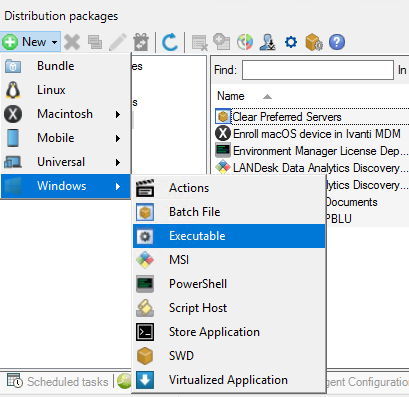
- Select the type of distribution package (My Packages, Content packages or Public packages) and click the +New button. Followed by Windows -> Executable.
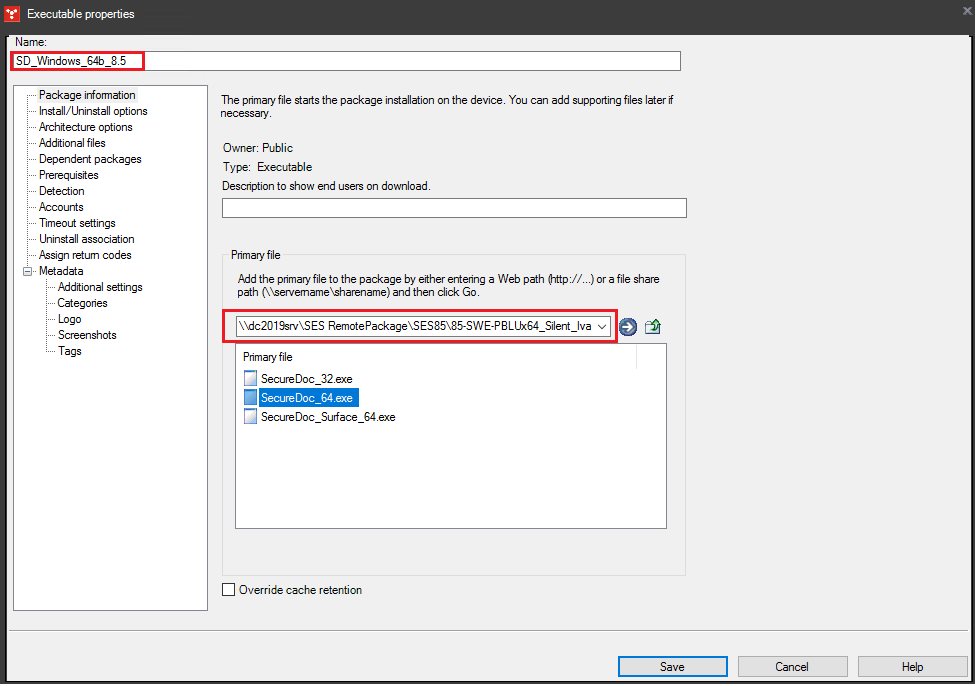
- Name the package to reflect as much as possible the actual SecureDoc installation package purpose. (Ex: SD_Windows_64b_8.5 – where the SecureDoc installation it’s intended for Windows 64 bit endpoints and the version is 8.5).
- The primary file you choose depends on the system you’re installing to. This could either be SecureDoc_32.exe, SecureDoc_64.exe or SecureDoc_Surface_64.exe. Following the mentioned example, this will be a 64 bit installation distribution package.
- Ensure the exact Install/Uninstall options syntax is included, shown below.
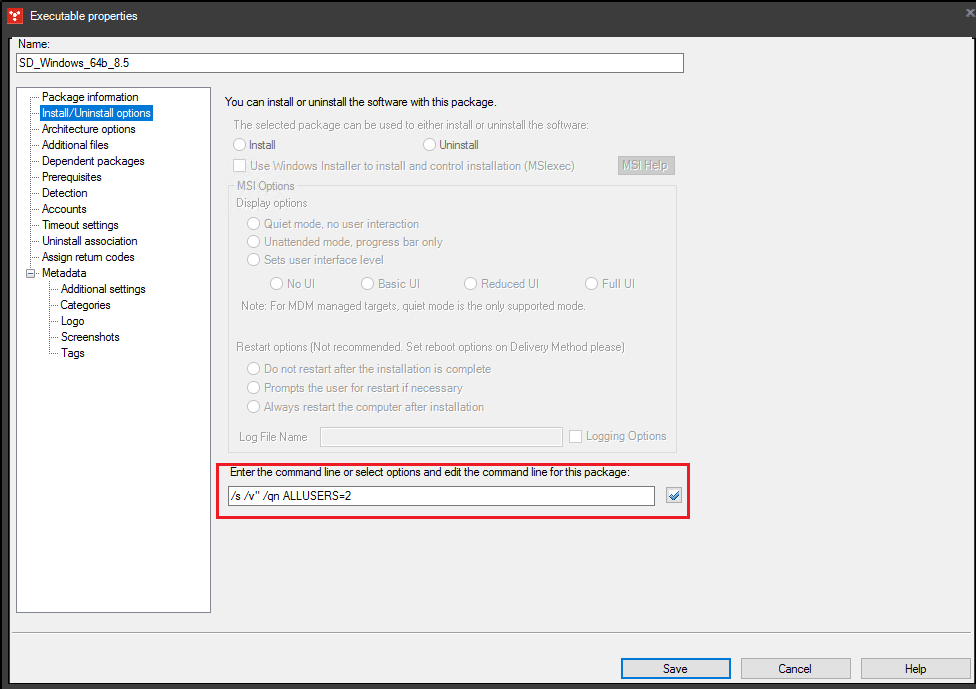

/s /v" /qn ALLUSERS=2
*Alternatively, if setup logging are required, this command line syntax can be also used.
/s /v" /qn /norestart /l*v %TEMP%\SecureDocSetup.log ALLUSERS=2
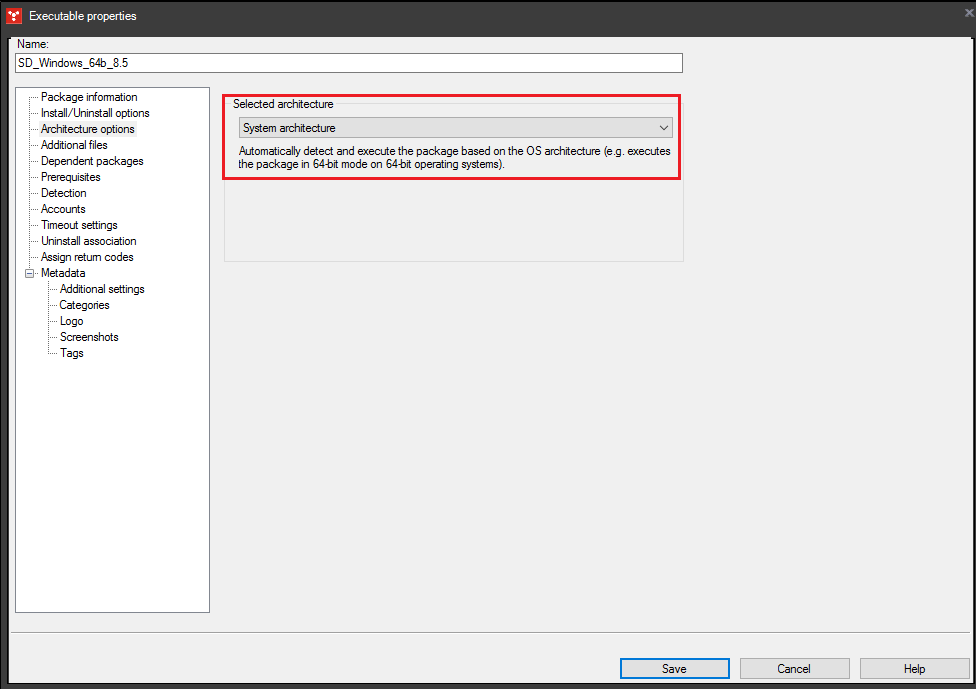
- Ensure the following Architecture options, shown below.
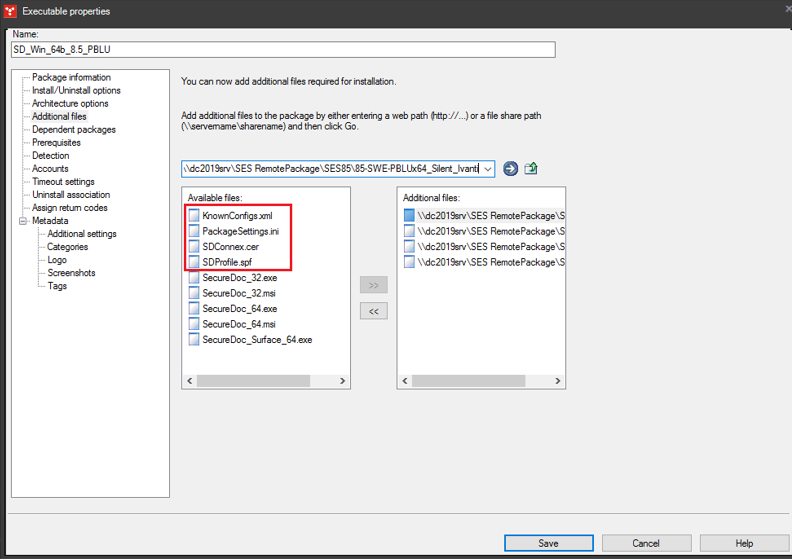
- Be sure to add the required Additional Files. The additional files could vary, but the core files that are needed are the EXE, SDConnex.cer, SDProfile.spf and PackageSettings.ini. If you have enabled SFE or a preboot background image, these will be required as well.
- KnownConfigs.xml
- PackageSettings.ini
- SDConnex.cer
- SDProfile.spf
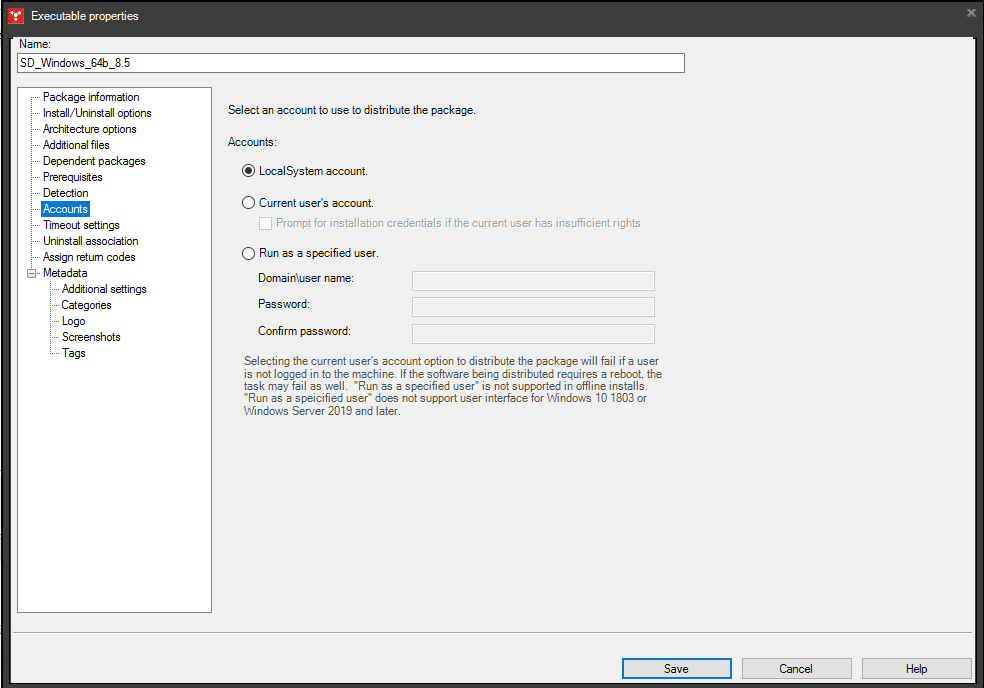
- Leave the Accounts setting at the default for Accounts installation – LocalSystem account, shown below.
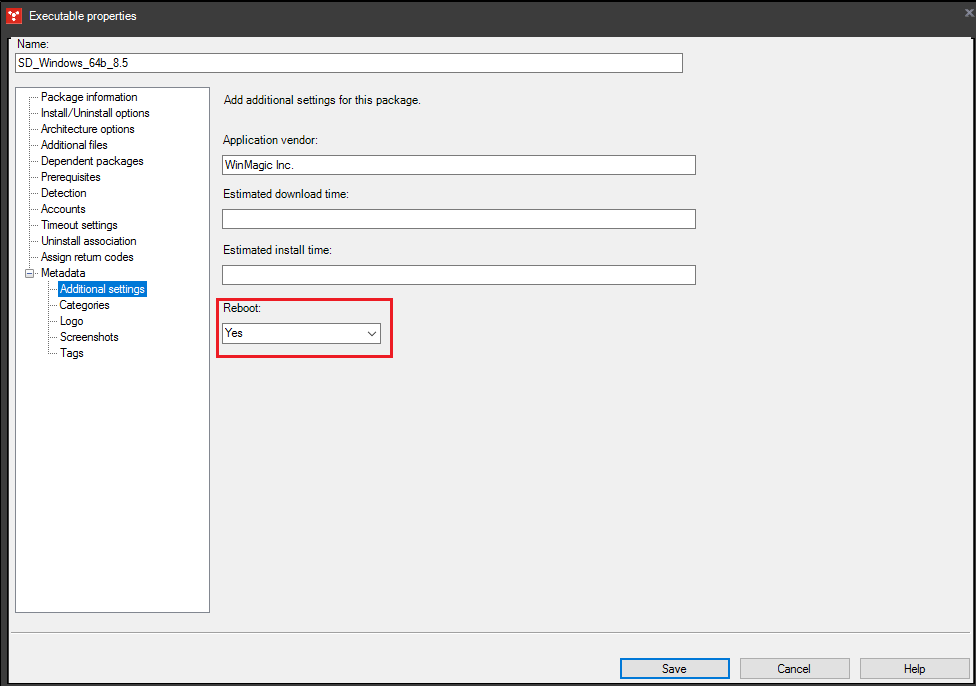
- Ensure that Reboot is enabled in Metadata Additional Settings, as shown below.
- Save the distribution package.
- Create the scheduled task.
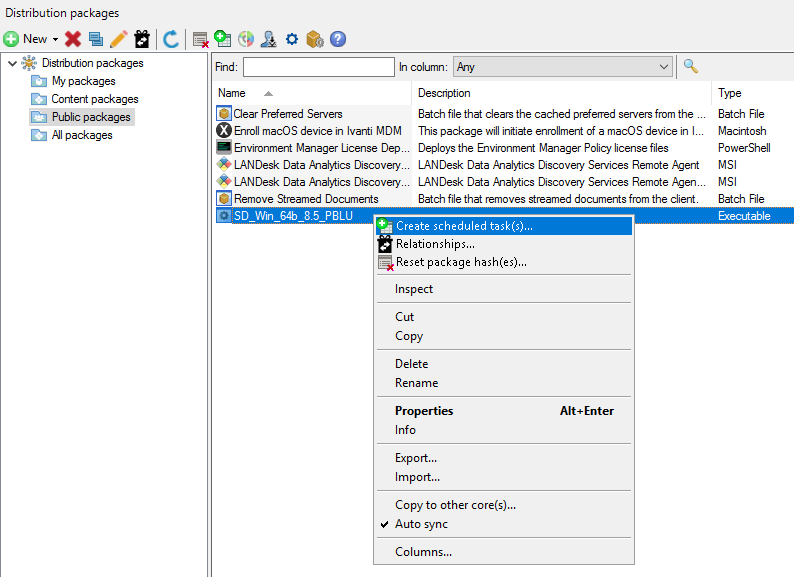
Distribution Package - Scheduled Task
A final configuration adjustment is needed once the SecureDoc distribution package is scheduled as a new task.
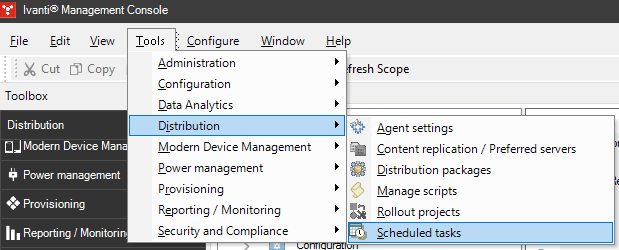
- From the upper menu, navigate and open the scheduled task.
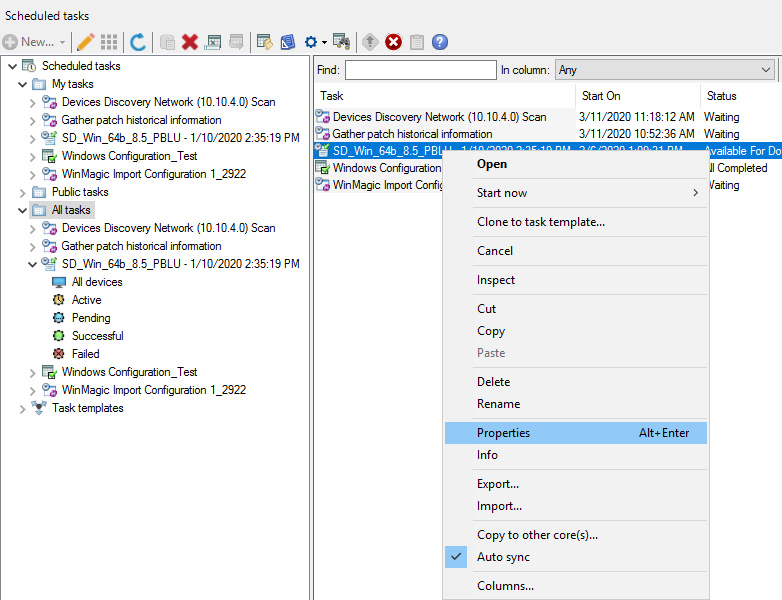
- Locate the SecureDoc distribution package scheduled task and select its properties.
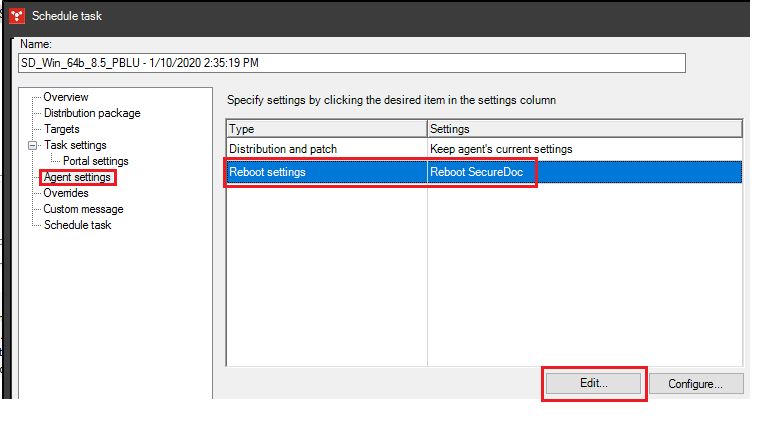
- Select Agent Settings, and ensure that the Reboot Settings are configured as below.
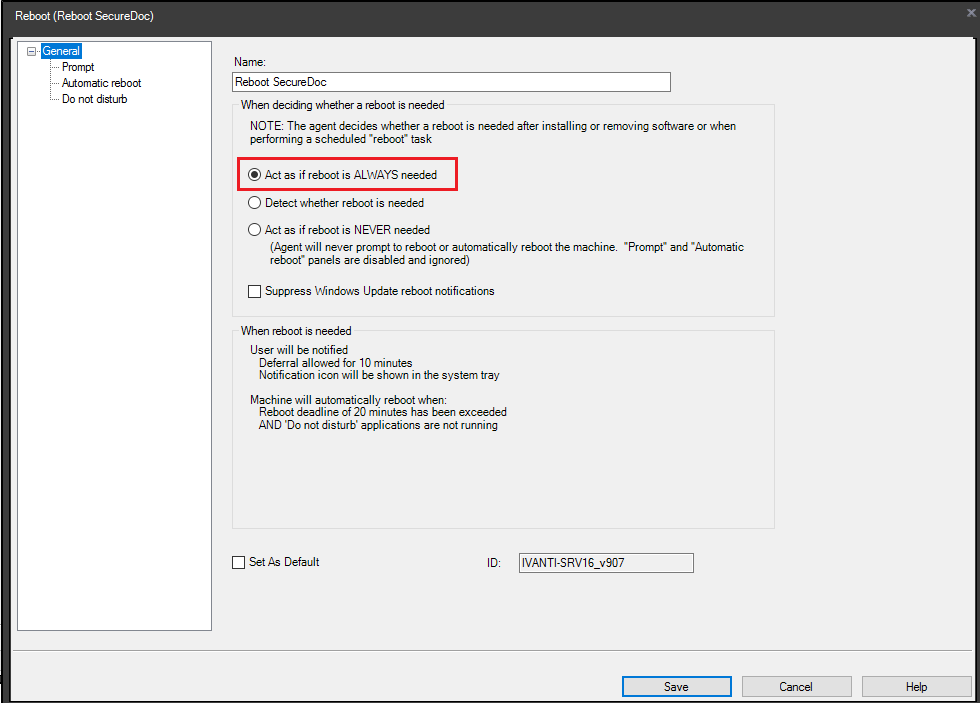
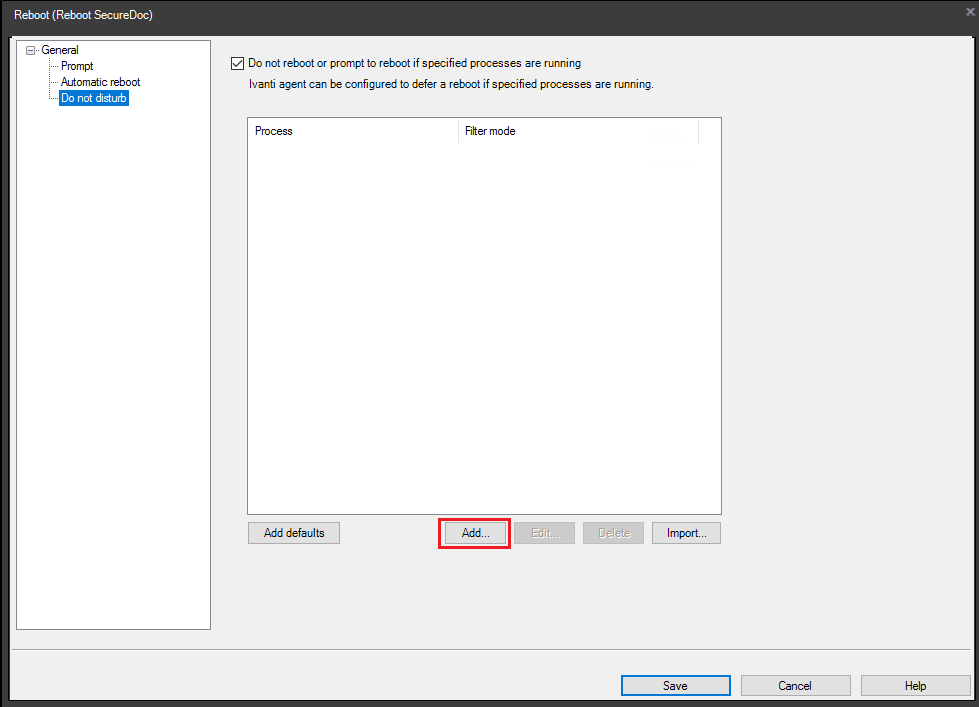
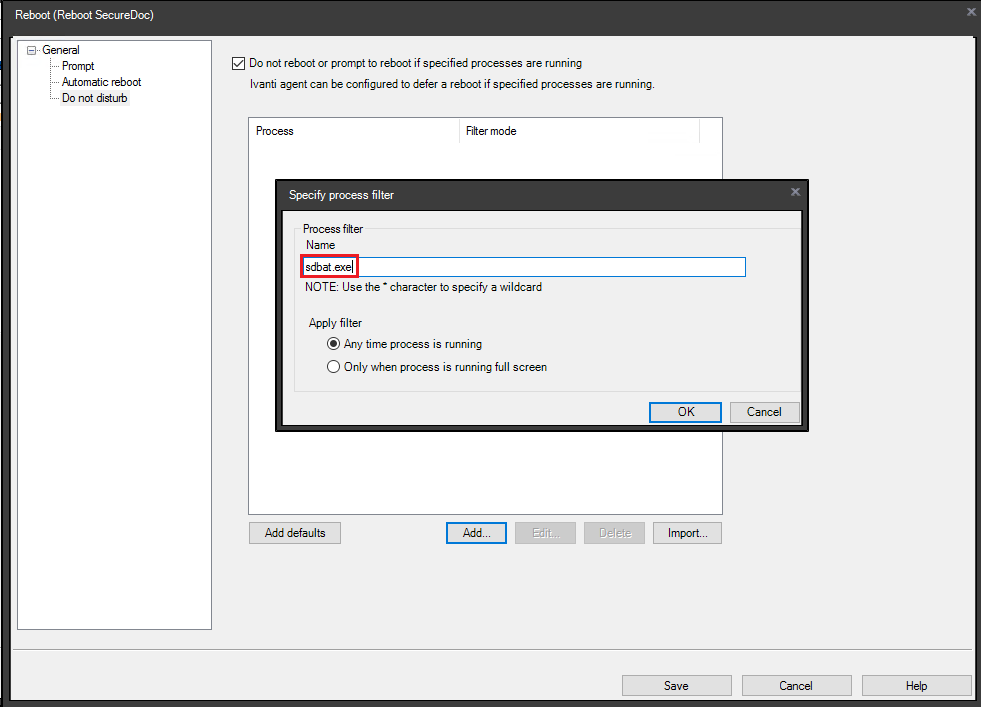
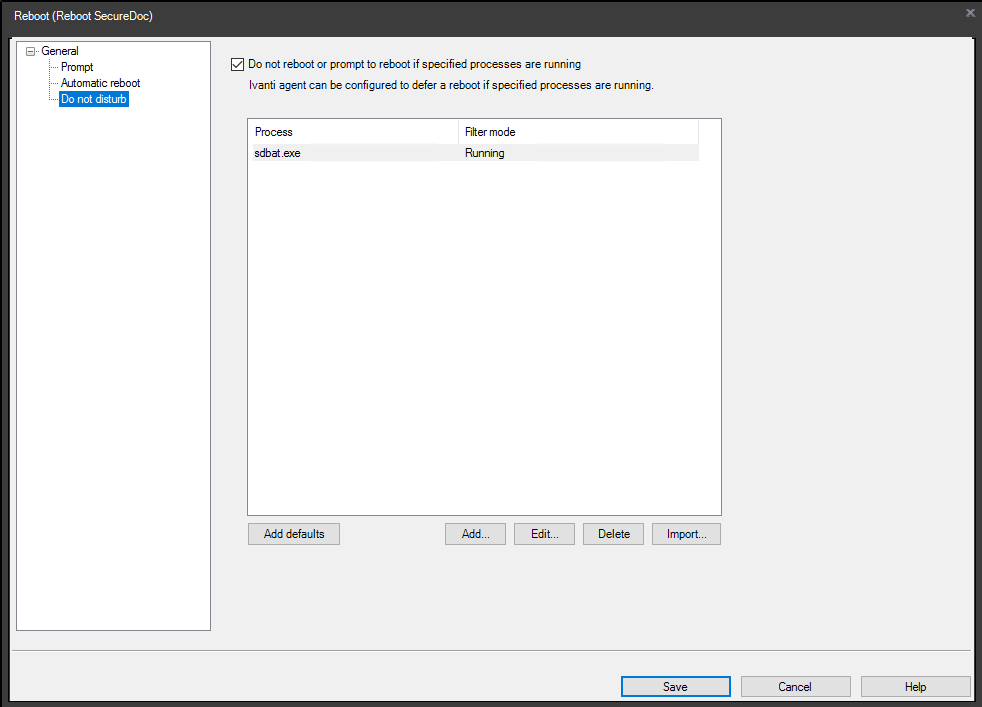
- Add the sdbat.exe to the “Do not disturb” option, as a condition to ensure the device does not reboot until the process finishes, as in the following three images.
Congratulations – You have completed the creation of a SecureDoc client silent installation deployment package.

5600A Cancross Court, Mississauga, ON, Canada L5R 3E9
Tel: (905) 502-7000 | Fax: (905) 502-7001
Web: www.winmagic.com | Email: [email protected]
WinMagic provides the world’s most secure, manageable, and easy-to-use data encryption solutions. Compatible with all editions of Microsoft Windows Vista, 7, and 10 as well as Mac and Linux platforms, WinMagic’s SecureDoc protects sensitive data stored on portable media such as laptops and removable media including USB thumb drives and CD/DVDs. Thousands of the most security-conscious enterprises and government organizations around the world depend on SecureDoc to minimize business risks, meet privacy and regulatory compliance requirements, and protect valuable information assets against unauthorized access. With a full complement of professional and customer services, WinMagic supports over three million SecureDoc users in approximately 43 countries. For more information, please visit www.winmagic.com, call 1-888-879-5879 or e-mail us at [email protected].
SecureDoc, SecureDoc Enterprise Server, Compartmental SecureDoc, SecureDoc PDA, SecureDoc Personal Edition, SecureDoc RME, SecureDoc Removable Media Encryption, MySecureDoc, MySecureDoc Personal Edition Plus, MySecureDoc Media, and SecureDoc Central Database are trademarks of WinMagic Inc. Other products mentioned herein may be trademarks and/or registered trademarks of their respective owner.
© Copyright 2011 WinMagic Inc. All rights reserved. This document is for informational purposes only. WinMagic Inc. makes NO WARRANTIES, expressed or implied, in this document. All specifications stated herein are subject to change without notice.