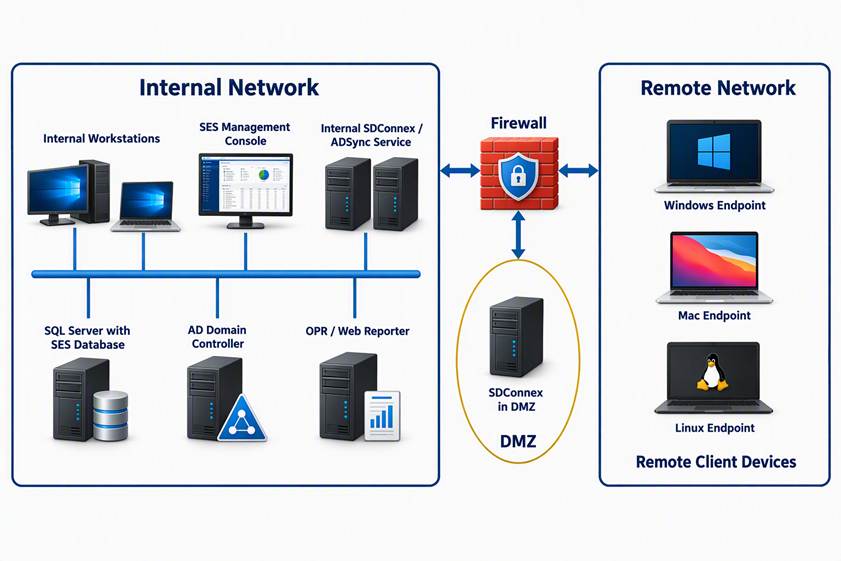
The following information is required to set up internet-facing SDConnex Server. There are two methods by which the customer can set up an Internet-facing SDConnex Server. This is required for customers whose equipment must be manageable when off the corporate LAN.
1. SDConnex runs on a server in the DMZ.
2. SDConnex running in LAN with Port Forwarding from Internet-facing address to in-LAN SDConnex.
WinMagic SecureDoc Network Design
Applicable to:
All SES versions. Refer to WinMagic’s website for system requirements with regards to the SecureDoc Enterprise Server: http://www.winmagic.com/support/technical-specifications.
Ports requirements for internal communication
SES Management Console
The console is the Management GUI application reading information from the SQL database. It can be installed on a server or on a workstation with access to SQL DB. Port 1433 to SQL DB (default) for SQL Communication.
SDConnex Server(s)
This server will host internal SDConnex, ADSync and Analytics Engine services. The following Inbound ports are required:
Port 7300 TCP for SDConnex communication
Port 389 TCP/UDP for ADSync service
Port 445 TCP/UDP for Microsoft-DS traffic
Port 88 TCP/UDP for Kerberos
Port 53 TCP/UDP for DNS
Port 1433 TCP for SQL communication
Optional for Outgoing Ports: 3700 UDP for client wake up calls when remote commands are present.
Client Device:
The device initiates a session to the SDConnex server on port TCP 7300.
The SDPin service runs locally on port TCP 3333.
Incoming Port: (optional): 3700 UDP to listen to wake up calls.
OPR/Web Reporter
Port 80 TCP/UDP for OPR / Web Reporter access
Firewall Ports to open:
Incoming (to DMZ): Port 7300 TCP from external network to SDConnex in DMZ
Outgoing (Optional): Port 3700 UDP for client wake up calls when remote commands are present
SDConnex running on a server in the DMZ
Probably the most secure in terms of Network Security is to set up an additional SDConnex service running on a server in the Network DMZ (de-militarized zone - a protected area outside the corporate LAN but behind its own firewall).
In this case, it will be necessary to provide a link between the SDConnex server and the SQL Database server hosting the SES database.
The ports that must be opened in the firewall that sit between the DMZ and the corporate line-of-business LAN are: 1433 for SQL database connectivity, and 1434 for SQL broadcast. So, the flow of information between devices connecting over the internet is as follows:
Device traffic on defined SDConnex port (default=Port 7300) -> Internet -> SDConnex address on DMZ Firewall -> SDConnex Service.
The flow of information between this in - DMZ SDConnex server is:
SDConnex traffic on ports 1433 and 1434 -> SQL Server address on DMZ to LAN firewall -> SQL Server in LAN.
SDConnex running in LAN with Port Forwarding from Internet-facing address to in-LAN SDConnex server
Alternatively, it is possible to have a Port-Forwarding rule on an internet-facing address on the corporate firewall that will route all traffic on the SDConnex port (default=Port 7300) to an SDConnex server on the corporate LAN.
If using Port Translation, the internet facing address could be accepting traffic on some other Port Number than 7300 and then translating that to Port 7300 (or whatever SDConnex is listening on) on the inside of the LAN. This methodology does not require any specific work to be done between SDConnex and the Database, as it leverages an existing in-LAN SDConnex traditional configuration.