This content is currently unavailable in French. You are viewing the default (English) version.
How to enable AES-NI with SD Standalone v5.3 SR2 (x64)
This article describes how to set up AES-NI with SecureDoc Standalone v5.3 SR2 (x64). Intel's AES-NI (New Instructions) are designed to speed up the execution of the AES algorithm by executing some of the steps in hardware.
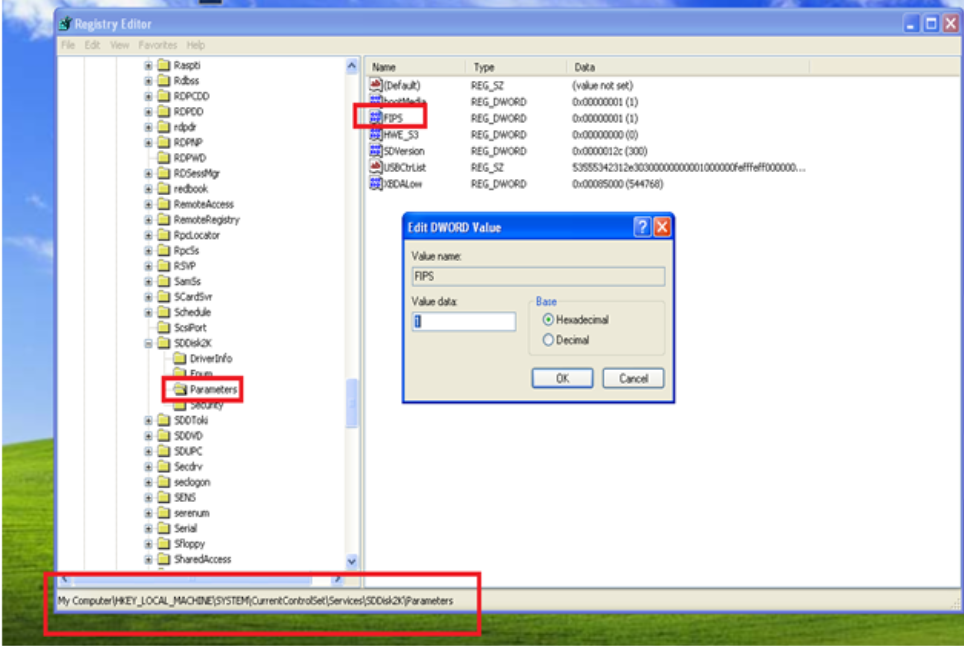
1. Install boot logon. 2. Log back into the computer. 3. Find the Windows Registry entry shown below and change it from 1 (the default value) to 0. This will enable AES-NI.