Problem:
An error can occur where an Apple Mac device is connect to Active Directory but the user cannot log in with a new AD Account after having logged out of the currently logged-in Account. This article clarifies how a missing Mac AD setting may be blocking the user's ability to log in.
Symptoms/example:
1) One user is using a Mac client device
2) The Mac is connected to Active Directory
3) A new user is created in AD
4) The first user on the device logs out of the Mac
5) An attempt is made to log in using the new User Account recently added to AD, entering the correct password.
6) This use may receive error message: “SecureDoc for FileVault 2: The current user can’t be added to FileVault 2 account list”, as shown in the image below: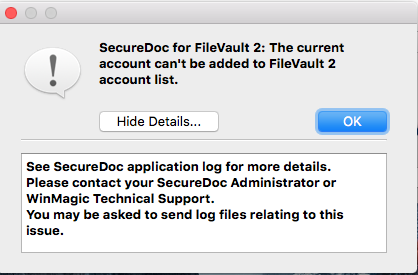
Solution:
This issue will occur if a specific setting Mac Login option Active Directory option has not been set on the client device.
To correct this:
1. Go to System Preferences > Users & Groups > Log-in Options
2. Click “Edit” button beside the Network Account Server
3. Click “Open Directory Utility”
4. Unlock the directory utility by entering the admin credentials
5. Double click on Active Directory
6. Verify that Create mobile account at login option is enabled, as shown in the image below: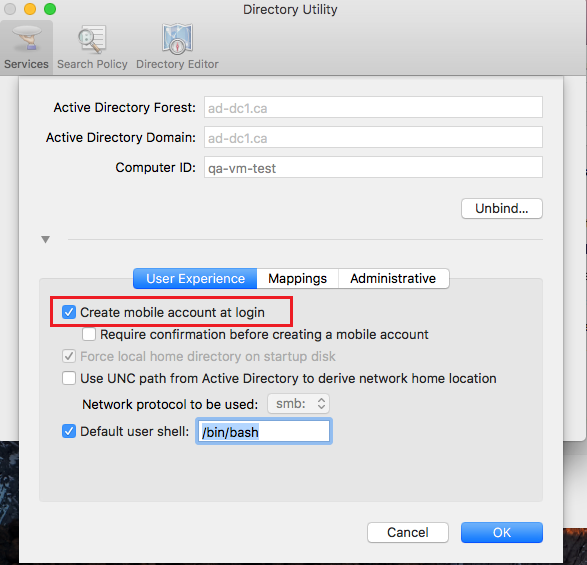
Searchwords: FileVault FileVault2 mac AD Active Directory account
1691 Error message: SecureDoc for FileVault 2: The current account can't be added to FileVault 2 account list
- Updated on Feb 6, 2026
- 1 minute(s) read
- VN
Was this article helpful?