WinMagic Securedoc application is not displayed in add\Remove or programs and features
Primary cause for this type of issue is that WinMagic installation was performed through 3rd party software but ALLUSERS=2 parameter was not added in deployment string.
missing Parameter ALLUSERS=2 (for all users will be able to view this )
ALLUSER=1 was used (then our application will only display for the installation user that ran the session)
This caused our application to be installed under System Root account .
If no User was provided then System Root account is used
To run any one of these we need to download Microsoft tool to allow Root account access
You don't have to know the password to logon as the LocalSystem, if you can execute a cmd prompt from an AT/Scheduler job or just use Microsoft Sysinternals psexec (download it from Microsoft if you don't already have http://technet.microsoft.com/en-us/sysinternals) to spawn a command prompt or any other application as the LocalSystem, e.g.
psexec -i -s -h %systemroot%\system32\cmd.exe (this works on Vista, XP, Windows 7, all the servers and Windows8)
Execute a WhoAmI.exe or echo %userprofile% to confirm you’re the local System, i.e.
Then in that elevated command prompt we should able to run msiexec manual uninstall
msiexec /x <ProductGUID> /qn /l*v C:\SD_uninstall.log
we can obtain product guid from HKLM\SOFTWARE\WinMagic\SecureDoc @ ProductCode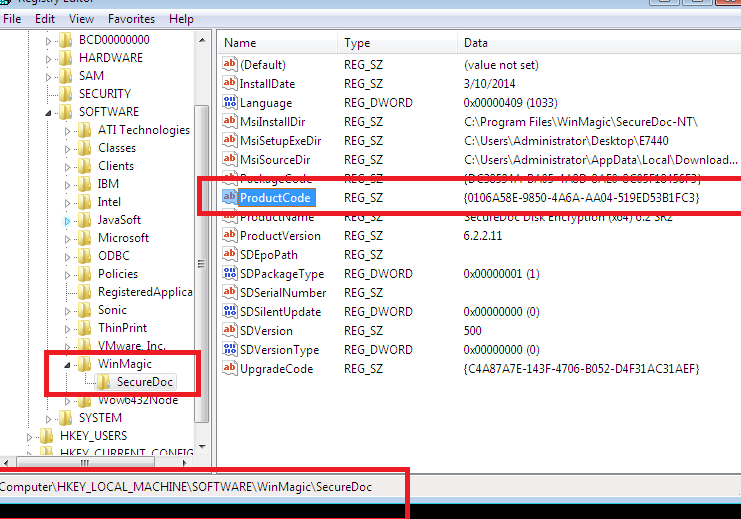
Custom Fields
|